Instagram Comment to DM Automation: The Complete 2026 Guide
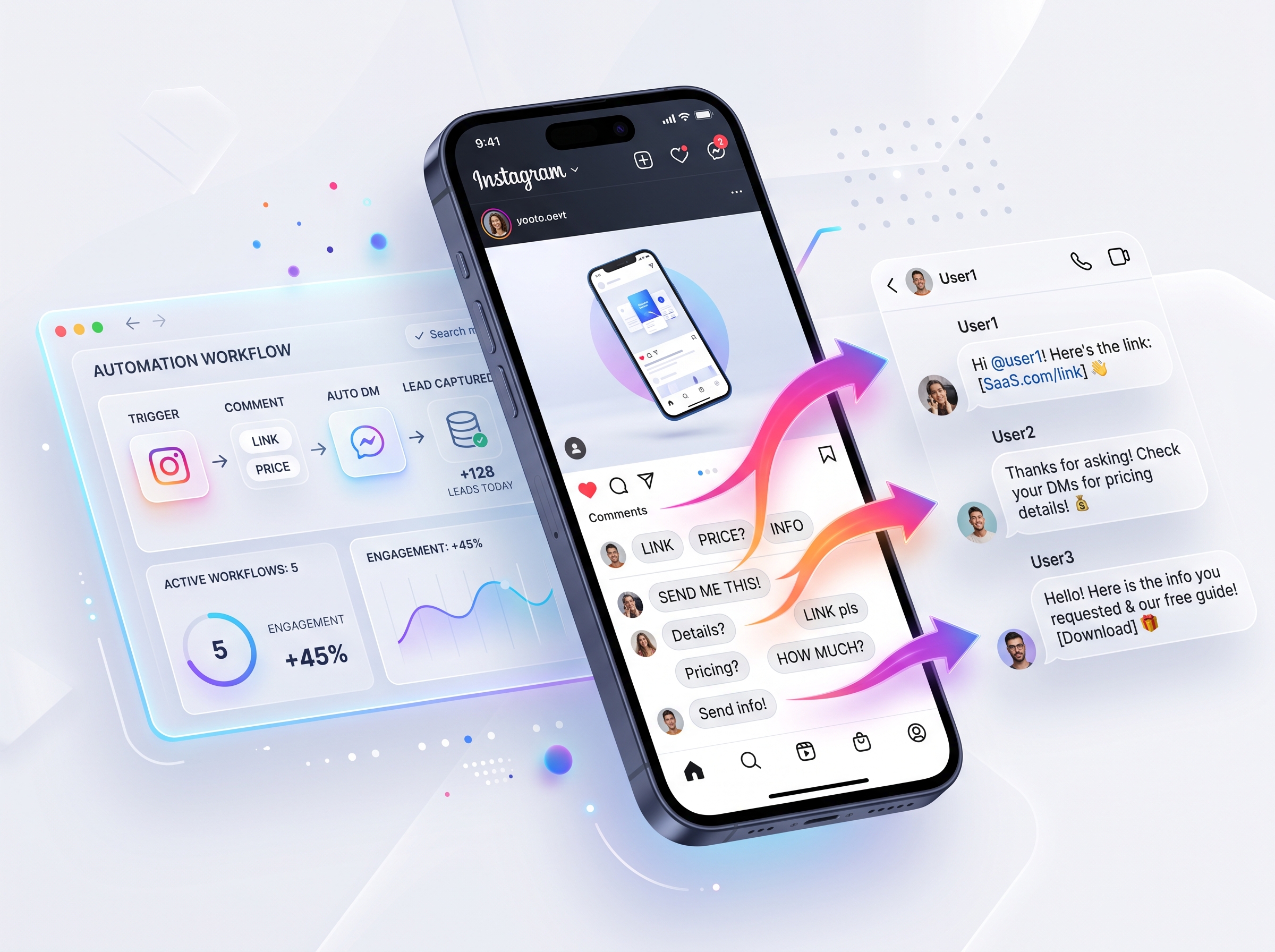
Quick Answer: Instagram comment to DM automation is a Meta API-powered system that automatically sends a private DM when someone comments a specific keyword on your post or Reel. It uses keyword detection via webhooks to trigger instant replies — turning every comment into a lead capture opportunity, 24/7.
Key Takeaways
- Instagram Comment to DM automation replies to comments with specific keywords by sending an automated private message — works 24/7 on posts, Reels, and carousels.
- Meta's Private Replies API allows up to 750 DM replies per hour per Instagram account; QuickDM's Pro plan safely operates at 185 DMs/hour.
- The hybrid strategy (public comment reply + private DM) maximizes both algorithm engagement and conversion rates.
- 8 core industries benefit: e-commerce, real estate, coaching, restaurants, travel, events, creators, and high-ticket services.
- QuickDM offers a free-forever plan (20 DMs/hour, up to 100 followers, up to 100 emails) and Pro at $10/mo global / ₹399/mo India — the cheapest INR-priced tool on the market.
- Always use Meta-approved tools; avoid unofficial bots that violate Instagram's terms and risk shadowbans or permanent bans.
What Is Instagram Comment to DM Automation?
Definition and Core Concept
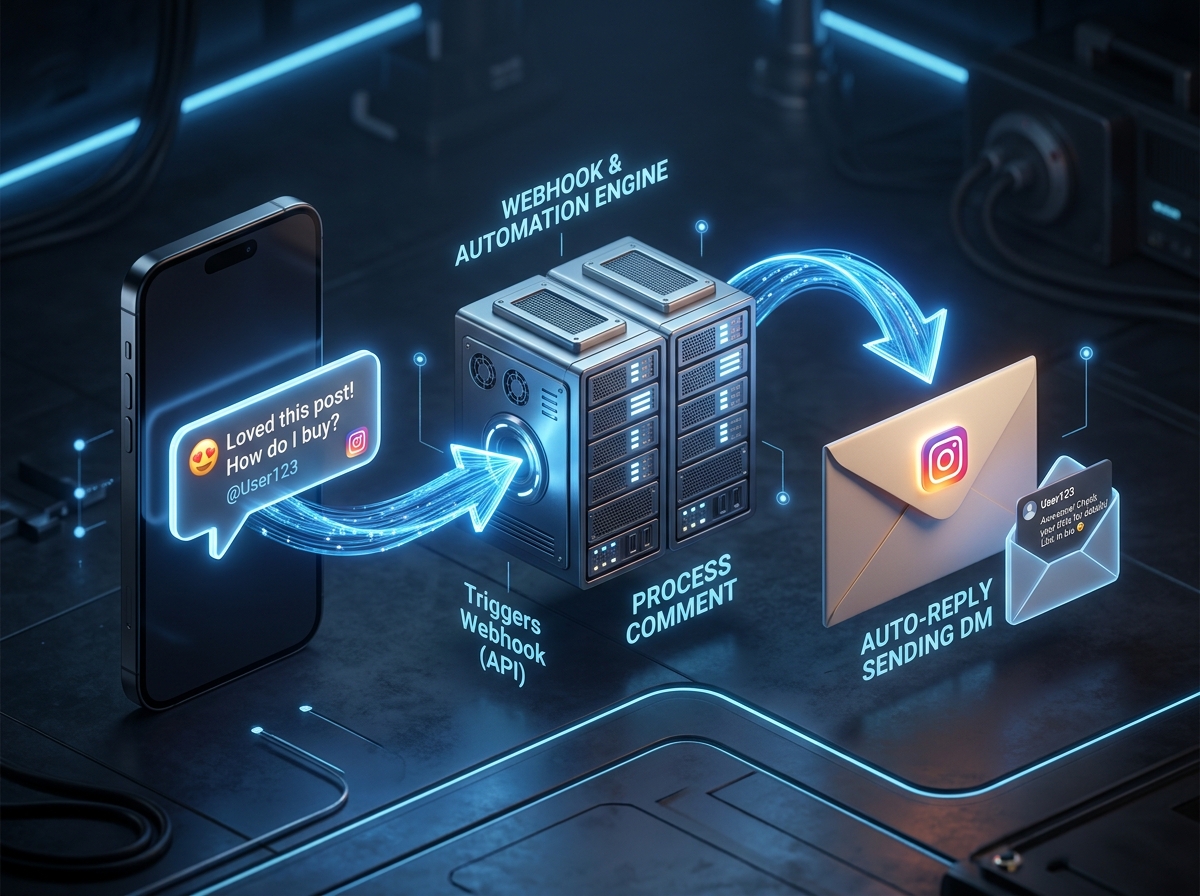
Instagram comment to DM automation is a technology layer that sits between your Instagram content and your audience, intercepting inbound comments and responding with targeted private messages. Unlike basic public comment auto-replies that everyone can see, this system delivers value directly to a user's inbox. When a follower comments "PRICE" on your Reel, the system detects that keyword through Meta's official webhook infrastructure and instantly sends a pre-written DM containing your product catalog and payment link. This is fundamentally different from link-in-bio strategies, which force users to leave Instagram, remember a URL, and navigate multiple taps. Comment-to-DM keeps the entire conversation inside Instagram's native messaging environment, reducing friction by roughly 60 percent based on typical Instagram DM automation tools performance data. The technology requires an Instagram Business or Creator account because Meta restricts API access to professional profiles, ensuring that only legitimate businesses can automate messaging at scale.
How It Fits Into Your Instagram Funnel
Every Instagram post sits at the top of a funnel that should move users from passive viewers to paying customers. Comment-to-DM automation is the critical bridge between awareness and conversion. The flow is simple: a user watches your Reel, feels compelled to engage, and leaves a comment. Without automation, that comment sits unanswered for hours while intent cools. With automation, the comment triggers an instant DM that delivers exactly what they asked for. This creates a complete auto DM guide moment where the user moves from public social space to private conversation space. For lead generation, this captures contact data automatically. For follower growth, you can gate resources behind a follow requirement. For customer support, you can deflect repetitive questions instantly. Compared to link-in-bio approaches, which lose 70-80 percent of users at each click-through step, DM automation maintains context and keeps the user engaged within the app they already have open.
Public Reply vs Private DM vs Hybrid — Which Should You Use?
Choosing between public auto-replies and private DM automation is not an either-or decision. Each approach serves a distinct purpose in your engagement strategy. Public replies are visible to everyone and signal to the Instagram algorithm that your content is generating conversation, which can boost reach. However, public replies cannot contain links, pricing, or sensitive information. Private DMs deliver rich content directly but do not contribute to public social proof. The hybrid approach, which QuickDM and other best Instagram automation tools support, combines both: a public reply that acknowledges the comment and a private DM that delivers the actual value. For most businesses, the hybrid strategy is the default recommendation because it maximizes algorithmic visibility while capturing leads. If you are running a viral giveaway, public-only replies might suffice. If you are delivering confidential pricing to high-ticket clients, private-only DMs may be preferable. But for e-commerce, coaching, and real estate — the hybrid model consistently outperforms single-channel approaches.
| Strategy | Pros | Cons | Best For |
|---|---|---|---|
| Public Only | Boosts algorithm reach; social proof visible | No links; no private data capture | Growth campaigns, giveaways |
| DM Only | Direct link delivery; private lead capture | No public engagement signal | High-ticket services, sensitive info |
| Hybrid | Algorithm + conversion combined | Slightly more setup | E-commerce, coaching, real estate |
How Instagram Comment-to-DM Automation Works: The Technical Flow
Step 1: Connect Your Instagram Business Account via Meta API
The foundation of safe automation is Meta's official Business API. You cannot use a personal Instagram account; you must convert to a Business or Creator account first. The connection process uses OAuth, meaning you log in directly through Meta's official portal — never sharing your password with a third party. Safe Instagram automation setup begins with this official login flow. QuickDM's connection walkthrough takes approximately two minutes: you authorize the app, grant messaging permissions, and select the Instagram account you want to automate. Meta then issues an access token that allows the tool to listen for comment webhooks and send replies on your behalf. This token is scoped specifically to messaging and content management, so the tool cannot post Stories or change your profile. Always verify that your tool uses this official flow; if it asks for your Instagram password, it is not API-compliant and should be avoided immediately.
Step 2: Configure Keyword Triggers
Keyword triggers are the decision engine of your automation. When Meta detects a new comment on your post, it pushes a webhook payload to your automation tool containing the comment text, post ID, and user handle. The tool then scans for matches against your configured keywords. Best practices demand short, unambiguous, action-oriented words: "PRICE," "JOIN," "MENU," or "GUIDE." Avoid generic conversational words like "yes" or "ok" that could trigger accidentally in normal replies. Keyword trigger configuration should also account for case insensitivity — "Price" and "PRICE" should trigger the same flow. Multi-keyword mapping allows you to assign several triggers to one automation, such as "BUY," "SHOP," and "LINK" all delivering the same catalog DM. You can set triggers universally across all posts or isolate them to specific posts, which is useful when running time-bound campaigns.
Step 3: Set Up the Automated DM Message
Your first automated DM should be under 300 characters, value-first, and written in a friendly, human tone. This is not a billboard; it is the start of a conversation. Include personalization variables like the commenter's first name to increase reply rates by 20-30 percent. Add button-based follow-ups when possible — Meta supports quick-reply buttons that let users select options without typing. For example, after sending a price list, you can offer buttons for "Buy Now," "Ask a Question," or "Not Interested." Be aware of the 24-hour messaging window: once a user interacts with your DM, you can send free-form messages for 24 hours. After that, you must use pre-approved templates. This window resets every time the user comments again or replies to your DM, making comment-to-DM automation a perpetual engagement engine.
Step 4: Enable Public Auto-Reply (Hybrid Strategy)
Public auto-replies serve two masters: your audience and the algorithm. When enabled, the tool posts a visible comment under the user's comment, thanking them and encouraging them to check their DMs. This public activity increases comment thread depth, which Instagram interprets as high-quality content worth distributing further. To avoid sounding robotic, write 3-5 rotating reply variations. Instead of "Check your DMs!" every time, rotate through "Sent you a message with the details," "Just DM'd you the link," and "Check your inbox for the full catalog." Avoid sounding robotic in automated DMs by varying emoji usage and sentence structure. Never use the exact same public reply twice in a row on the same post, as repetitive patterns can trigger spam detection.
Step 5: CRM Logging, Lead Tagging, and Follow-Up
Every comment trigger generates a data record that should be treated as a CRM entry. QuickDM stores the post ID, keyword used, timestamp, Instagram handle, and engagement status. This creates a lead status pipeline: New → Engaged → Converted. You can export these records as CSV for import into HubSpot, Salesforce, or Google Sheets. CRM logging and lead tagging allow you to segment audiences by interest — everyone who commented "PRICE" on your jewelry Reel becomes a "Hot Lead - Jewelry" segment. For agencies managing multiple clients, this data is invaluable for proving ROI. Advanced users can set up Zapier integrations to push new leads directly into their existing sales stack, ensuring no comment-generated lead falls through the cracks.
Step 6: Test Before Going Live
Never launch an automation without testing. Use a secondary Instagram account to comment your trigger keyword on a test post. Verify three things: keyword accuracy (does the exact word trigger it? do nearby words accidentally trigger it?), DM delivery speed (should arrive within 10-30 seconds), and public reply visibility (does it appear correctly under the comment?). Test Instagram automation before going live with a checklist that includes testing multi-keyword sets, follower gate behavior, and message character limits. Common failures include keywords that are too short ("A" triggers on every comment containing the letter A) and messages that exceed Meta's 1,000-character DM limit. Fix these in testing, not in front of your audience.
Meta API Rate Limits and Safety Rules You Must Know
Official Instagram Messaging Rate Limits (2026)
According to Meta's official Graph API documentation, Instagram messaging operates under several rate limit tiers that every automation user must understand. The Private Replies API, which powers comment-to-DM automation, allows up to 750 calls per hour per Instagram professional account for replies to comments on posts and Reels. The Conversations API is capped at 2 calls per second per account. The Send API for text and links permits 100 calls per second per account, while audio and video sends are limited to 10 calls per second. These limits are hard ceilings enforced at Meta's infrastructure level — exceeding them results in temporary API throttling or permanent app suspension. Meta API rate limits explained in detail show that these quotas reset hourly and are tracked per account, not per tool. If you manage multiple Instagram accounts, each has its own independent quota.
| API Endpoint | Rate Limit | Typical Use Case |
|---|---|---|
| Private Replies API | 750 calls/hour per account | Comment-to-DM automation |
| Conversations API | 2 calls/second per account | Thread retrieval and status checks |
| Send API (text/links) | 100 calls/second per account | General DM delivery |
| Send API (audio/video) | 10 calls/second per account | Rich media DM delivery |
Tool-Side Safety Caps vs Meta Hard Limits
Reputable automation tools do not attempt to operate at Meta's absolute maximum. Instead, they implement internal safety caps to protect your account from accidental throttling. QuickDM's Free plan operates at 20 DMs per hour, while Pro operates at 185 DMs per hour — both well below the 750/hour ceiling. This "safety buffer" philosophy recognizes that API limits can change, that burst traffic patterns are unpredictable, and that your account health is worth more than squeezing every last message out of the quota. Safe DM automation practices recommend choosing tools that publish their internal caps transparently. If a tool claims "unlimited DMs" or "no rate limits," it is either lying or using unofficial methods that will eventually get your account restricted.
What's Allowed vs What's Not Allowed (June 2026)
Meta draws a bright line between inbound automation and outbound spam. Allowed behaviors include keyword-triggered automation on your own content, follower-gated resource delivery, and automated responses to Story mentions. Not allowed behaviors include sending cold DMs to non-followers, automating actions on other users' posts, and using scraping or reverse-engineered bots. Instagram ban wave protection starts with understanding these boundaries. If your automation only responds to users who voluntarily commented on your content, you are operating within Meta's terms. If you are importing contact lists and blasting unsolicited messages, you are violating them. The distinction is simple: inbound intent signals are fair game; outbound interruption is not.
How to Verify Your Tool Is Meta-Approved
Meta maintains a Business Partner program that verifies API compliance. Check your tool's website for a Meta Business Partner badge or link to their partner directory listing. Red flags include requests for your Instagram password (official tools use OAuth), claims of "unlimited DMs" (impossible under Meta's limits), and absence of visible rate limiting disclosures. Meta-approved automation tools will always direct you to Meta's official login portal and will never store your credentials. If you cannot find clear documentation about API compliance on a tool's website, assume it is unofficial and avoid it. Your account's long-term health is not worth the risk of a shadowban or permanent suspension.
[CTA: Protect your account with Meta-approved automation → https://quickdm.app/signup]Why Instagram DM Automation Is No Longer Optional in 2026

The True Cost of Missing Comments
Every comment that goes unanswered is a lead that goes cold. Consider a simple calculation: if you post 30 times per month and receive just 10 comments per post that contain purchase intent ("price?", "how to buy?", "details?"), that is 300 warm leads monthly. If your average deal value is ₹1,500 and you convert 10 percent of inquiries, missing even half of those comments costs you ₹22,500 per month or ₹4.5 lakhs annually. Indian small business Instagram automation is not a luxury at these numbers — it is revenue protection. Manual teams sleep, take weekends off, and get overwhelmed during viral spikes. Automation does not. The cost of inaction is measurable and compounding.
Speed Is the New Competitive Advantage
Response time directly correlates with conversion probability. A lead who receives a price quote within 30 seconds of commenting is 7x more likely to purchase than one who waits 2-8 hours for a manual reply. Off-hours coverage is where automation demonstrates its most dramatic advantage: manual response drops to 0 percent at 2 AM, while automated systems maintain 100 percent coverage. How brands use DM automation shows that viral Reels generating 500+ comments are impossible to handle manually but are fully managed instantly by automation. The competitive landscape in 2026 is defined by who responds first, not who has the best product photography.
| Metric | Manual Replies | QuickDM Automation |
|---|---|---|
| Response time | 2–8 hours | <30 seconds |
| Off-hours coverage | 0% | 24/7 |
| Replies per hour | ~15–20 | 20 (Free) / 185 (Pro) |
| Lead data capture | Informal / none | Automatic CRM logging |
| Viral reel (500 comments) | Impossible to handle | Fully handled instantly |
| Monthly cost | ₹15,000–30,000 (VA salary) | ₹0 (Free) / ₹399 (Pro) |
Instagram's Algorithm Favors Engagement Velocity
Rapid replies do more than convert leads; they signal content quality to Instagram's distribution algorithm. When a post generates comments and those comments receive replies quickly, the algorithm interprets the content as highly engaging and worthy of broader distribution. Public replies increase comment thread depth, which is a direct ranking factor. Instagram automation for Indian creators leverages this by ensuring every comment receives a public response within seconds, creating a snowball effect of organic reach. DM conversations also improve your account's engagement score, which influences how often your content appears in Explore and Reels tabs. Automation is not just a sales tool; it is an organic growth accelerator.
8 High-Converting Use Cases for Instagram Comment Automation

1. E-Commerce and D2C Brands: Price + Purchase Link Delivery
E-commerce brands use comment-to-DM automation as a frictionless checkout initiator. When a user comments "PRICE" on a product Reel, the automation instantly delivers a DM with the item price, size availability, and a direct purchase link. For Indian D2C brands, this can include UPI and Razorpay integration for immediate payment collection. E-commerce Instagram automation also supports follow-up sequences for abandoned DM carts — if a user clicks the link but does not purchase within 24 hours, a gentle reminder DM can recover the sale. Brands like Reba Aura, with 150K+ followers, use this exact workflow to send collection links via comment triggers, converting casual viewers into paying customers without ever leaving the Instagram app.
2. Real Estate: From Comment to Site Visit Booking
Real estate is a high-ticket, high-touch industry where speed determines deal capture. Comment "INFO" on a property walkthrough Reel, and the automation sends a DM with project details, a map pin, starting price, and a site visit booking link. Instagram DM automation for real estate handles pre-qualification questions automatically — budget range, preferred configuration, and timeline — before handing off hot leads to a human broker via WhatsApp. SuratPropertyOfficial and similar agencies handle 250+ comments per Reel using automation, ensuring no prospect waits hours for basic project information. The WhatsApp handoff preserves full chat context, so the broker knows exactly which property and price range the lead inquired about.
3. Coaches and Course Creators: Registration + Enrollment Funnel
Coaching businesses run on enrollment deadlines and batch capacity. Comment "JOIN" on a result announcement Reel, and the automation delivers course details, upcoming batch dates, and a Razorpay enrollment link. Instagram automation for coaches captures email addresses before delivering full curriculum previews, building your list even from users who do not immediately enroll. Automated payment reminders nudge prospects who opened the enrollment link but did not complete payment. Post-enrollment, automation can request testimonials and refer-a-friend codes, turning one conversion into a viral growth loop. This is especially powerful for UPSC, CA, NEET, and fitness coaching markets in India where batch timing is everything.
4. Restaurants and Food Brands: Menu + Reservation Links
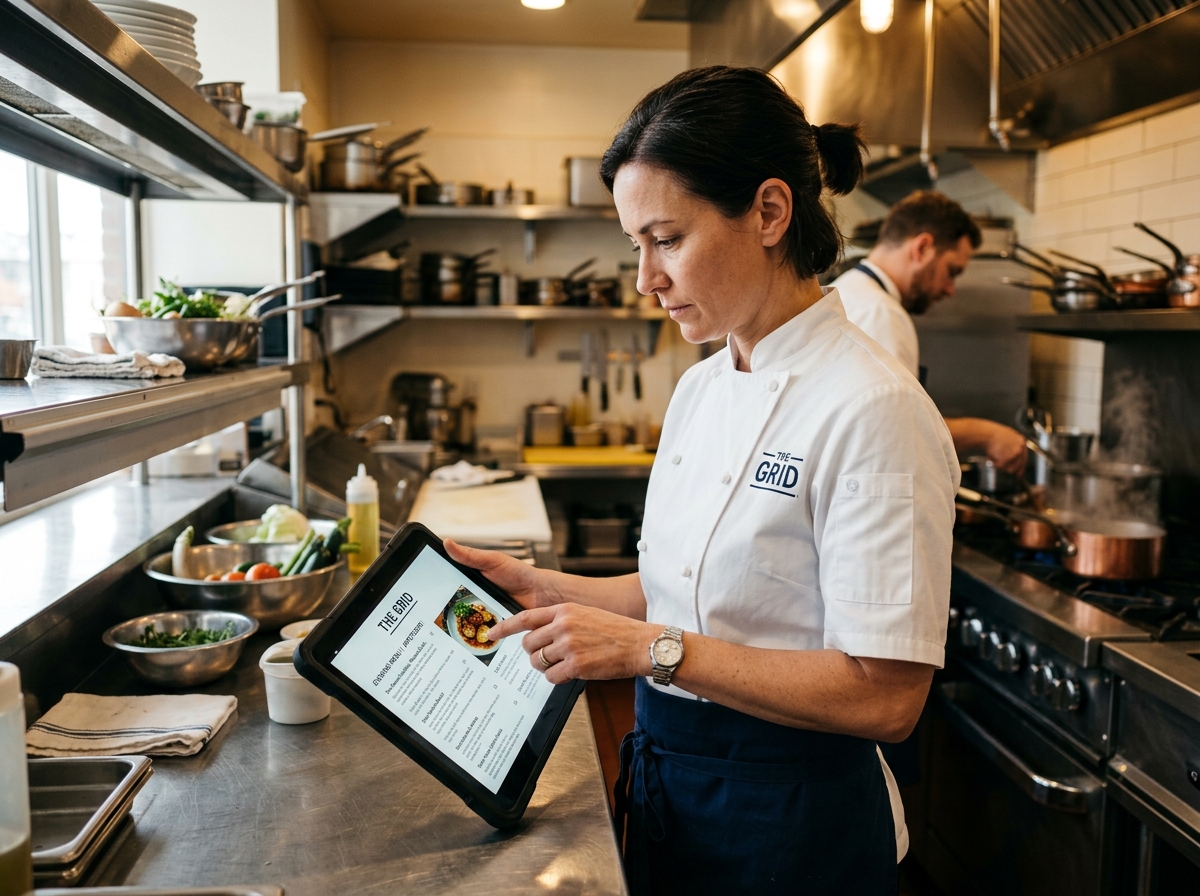
Restaurants and cloud kitchens operate in real-time — today's menu, tonight's table availability, this week's specials. Comment "MENU" on a food Reel, and the automation sends a PDF menu plus an ordering link. Comment "TABLE" triggers instant booking confirmation with time slot selection. Restaurant Instagram automation can deliver special follower-only offers, driving repeat visits from your Instagram community. For Swiggy and Zomato independent brands, this creates a direct ordering channel that bypasses aggregator commissions. Location and timing auto-responses handle the most common questions ("Are you open now?" "Where are you located?") without human intervention, freeing staff to focus on service.
5. Travel Agencies: Package Details + WhatsApp Handoff
Travel bookings require extensive back-and-forth: dates, destinations, budgets, traveler count. Comment "PACKAGE" on an itinerary Reel, and the automation sends a detailed PDF with pricing, inclusions, and exclusions. Travel agency Instagram automation uses Instagram DM for the first touch and WhatsApp for deep conversation, where longer voice notes and document sharing are easier. Multi-language keyword support means a user can comment in Hindi and receive the response in Hindi, critical for India's regional travel markets. Seasonal promotion triggers — "MONSOON" for Kerala packages, "SNOW" for Manali trips — align automation with demand cycles.

6. Events and Ticketing: Purchase Flow in DM
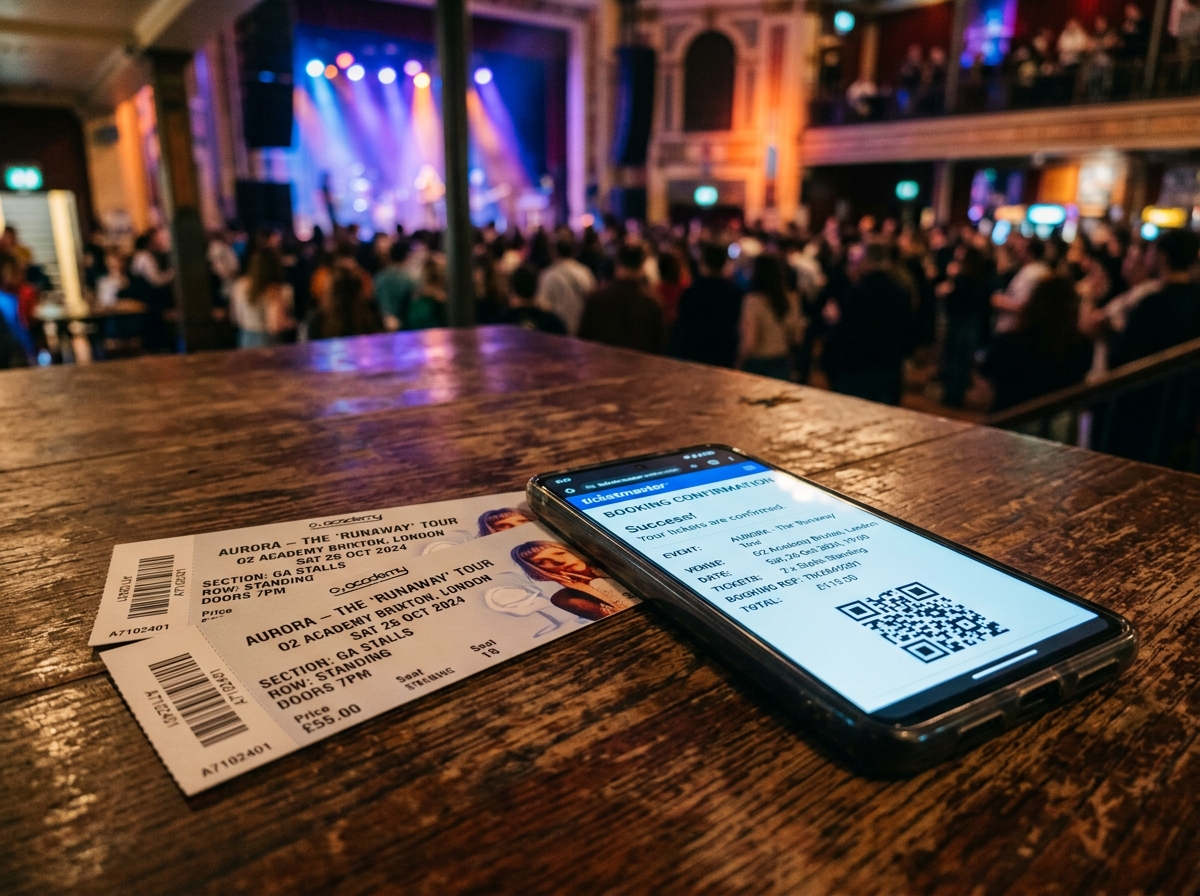
Event marketing is time-sensitive; early-bird windows close, shows sell out, and FOMO drives impulse purchases. Comment "TICKETS" on an event announcement, and the automation delivers a BookMyShow or Insider link, or a direct UPI payment option for self-hosted events. Event ticketing automation Instagram handles group discount inquiries automatically — "How much for 5 tickets?" — and applies early-bird pricing without manual coupon code entry. Post-event, the same automation flow can collect feedback and share photo gallery links, extending the engagement lifecycle beyond the event date. For stand-up comedy, workshops, and concerts in India, this turns announcement posts into self-service box offices.
7. Workshops and Creators: Follower-Gated Resources
Creator economy monetization often starts with free value. Gate high-value resources — PDF guides, Notion templates, discount codes — behind a follow-plus-comment requirement. The automation checks if the user follows you; if not, it sends a message asking them to follow first and comment again. Follower growth automation using this strategy typically increases follower counts by 15-40 percent during viral posts. This is recommended when you have high-value exclusive content or are building a pre-launch audience. It is not recommended for new accounts still building trust, or for high-ticket services where every lead matters regardless of follow status. The follower gate is a growth tool, not a universal filter.
8. Franchise and High-Ticket Services: Pre-Qualification Funnels
High-ticket services — consulting, enterprise software, luxury real estate — cannot afford to waste time on unqualified leads. Automation handles the initial DM pre-qualification: budget range, location, intent timeline, and decision-making authority. High-ticket sales automation Instagram filters hot leads before your human sales team ever sees them. Qualified leads are pushed to your CRM with full context and scheduled into Calendly or Cal.com automatically. This ensures your sales team spends 100 percent of their time on prospects who have already self-selected as high-intent, rather than manually sorting through hundreds of casual inquiries.

Instagram Comment Automation Pricing: QuickDM vs Competitors


Competitor Pricing Comparison Table (June 2026)
Pricing transparency is essential when choosing an automation tool, because hidden costs can destroy your ROI. ManyChat uses per-contact billing, which means your bill scales with audience size regardless of message volume. CreatorFlow and LinkDM use flat monthly rates but cap total DMs. QuickDM uses a flat rate based on hourly DM capacity, which aligns cost with actual usage intensity rather than audience bloat. Free vs paid Instagram automation comparisons reveal that only QuickDM offers a truly unlimited-automation free plan with no credit card requirement.
| Tool | Free Plan | Paid Start (USD) | DM Cap (Entry) | Billing Model | INR Pricing? |
|---|---|---|---|---|---|
| ManyChat | 25 contacts, 4 automations | $14/mo Essential [Source: manychat.com/pricing, verified Jan 2026] | 250 contacts/mo | Per-contact | No |
| CreatorFlow | 500 DMs/mo | $12–15/mo [Source: creatorflow.so/pricing, verified Jan 2026] | 5,000/mo | Flat DM cap | No |
| LinkDM | 1,000 DMs/mo | $19/mo [Source: linkdm.com/pricing, verified Jan 2026] | 25,000/mo | Flat DM cap | No |
| InstantDM | Unclear (7-day trial only) | $9.99/mo [Source: instantdm.com/pricing, verified Jan 2026] | 750/hr | Flat rate | No |
| QuickDM | Unlimited automations, 20/hr, 100 followers, 100 emails | $10/mo / ₹399/mo India [Source: quickdm.app, verified Jan 2026] | 185/hr | Flat rate | Yes |
Why Per-Contact Billing Can Cost You More
ManyChat's per-contact billing model has documented flaws. Trustpilot complaints highlight "ghost contacts" — inactive users who remain counted toward your billing tier — and auto-scaling traps where your plan upgrades without explicit consent [Source: trustpilot.com/review/manychat.com, verified Jan 2026]. If you run a giveaway that attracts 5,000 entrants, your ManyChat bill could spike overnight. ManyChat vs QuickDM shows that flat-rate predictability protects your margins. With QuickDM, you pay for throughput capacity (DMs per hour), not audience size. A brand with 100,000 followers and low engagement pays the same as a brand with 10,000 followers and high engagement, as long as their hourly DM volume stays within the plan limit.
QuickDM's Free Forever Plan: What's Included
QuickDM's free plan is genuinely free forever — no credit card, no time limit, no automation count restrictions. You get unlimited automations (not limited to 4 like ManyChat), 20 DMs per hour, follow-gating up to 100 followers, and email collection up to 100 emails. QuickDM free plan benefits include full access to the hybrid public+DM strategy, rotating reply variations, and CSV export. For emerging creators and small businesses in India, this free tier often handles all automation needs for the first 3-6 months of growth. You only upgrade when your comment volume exceeds 20 DMs per hour consistently.
QuickDM Pro: Best Value for India and Global Users
QuickDM Pro is priced at $10 per month globally or ₹399 per month for India — the cheapest INR-priced Instagram DM automation tool on the market. At current exchange rates, ₹399 converts to roughly $4.75 USD, making it the most affordable paid option globally as well. Pro increases your DM capacity to 185 per hour, which is safely below Meta's 750/hour ceiling while handling up to 4,440 DMs daily. QuickDM pricing details confirm no per-contact fees, no hidden charges, and no branding on outgoing messages. For Indian agencies managing multiple client accounts, this pricing structure makes margin-friendly reselling possible.
[CTA: Start free with zero risk — upgrade to Pro only when you scale → https://quickdm.app/signup]The Follower Gate Strategy: Turn Every Comment Into a New Follower
How Follower Gating Works
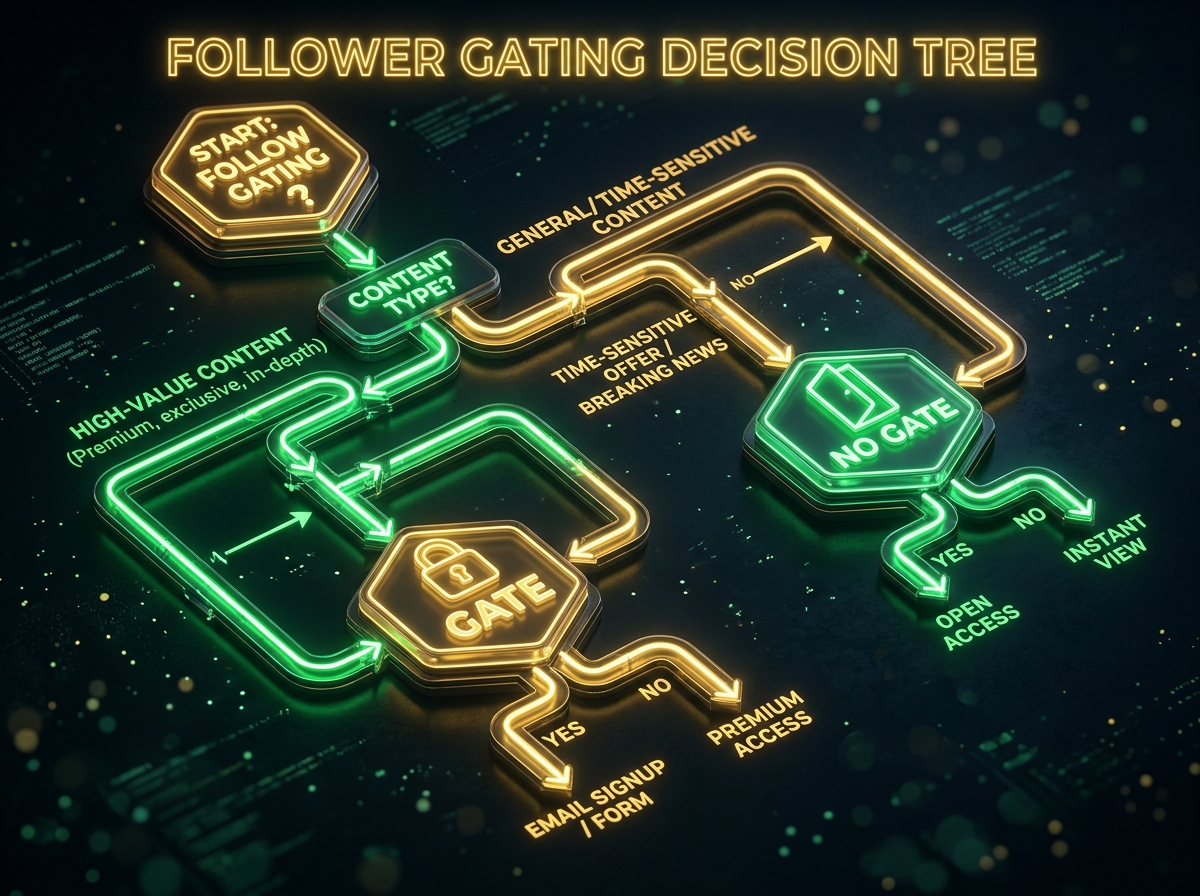
Follower gating adds a conditional check to your automation: before delivering the promised resource, the tool verifies whether the commenter follows your account. If they do, the DM delivers immediately. If not, they receive a message like: "Follow us first, then comment again to receive the full catalogue!" QuickDM follower gate feature enables this with a one-click toggle during automation setup. This turns every resource request into a growth opportunity, compounding your follower base while you sleep. The psychology is simple: users who valued your content enough to comment will value the gated resource enough to follow.
When to Use Follower Gating (and When Not To)
Use follower gating when you have high-value exclusive content, during viral content moments, or when building a pre-launch audience. Avoid it for real estate (every lead matters regardless of follow status), time-sensitive events (you cannot afford to add friction), and new accounts still establishing trust. Instagram growth automation India strategies should match gate usage to account maturity. A creator with 50,000 followers can gate freely; a restaurant with 500 followers should deliver menus unconditionally to maximize conversion.
Follower Gate Performance Metrics
Typical follower growth increases by 15-40 percent during viral posts when follower gating is active. The impact on long-term organic reach is significant because Instagram's algorithm distributes content more heavily to followers than non-followers. Viral content automation strategy documentation shows that accounts using follower gates consistently see higher Reels reach in the weeks following a viral post, because the new followers continue engaging with subsequent content. Track your follower-to-comment conversion rate as a core KPI when testing this strategy.
Setting Up Instagram Comment to DM Automation in QuickDM: Step-by-Step
Prerequisites: Three Things You Need
Before you begin, confirm you have three things: an Instagram Business or Creator account (personal accounts cannot access Meta's messaging API), a Meta-approved automation tool (QuickDM), and at least one published post or Reel to test against. Instagram Business account requirements are straightforward — convert your personal account in Instagram settings under "Account type and tools." Ensure your profile is complete with a bio, profile picture, and at least 3-5 posts so Meta recognizes it as an active professional account.
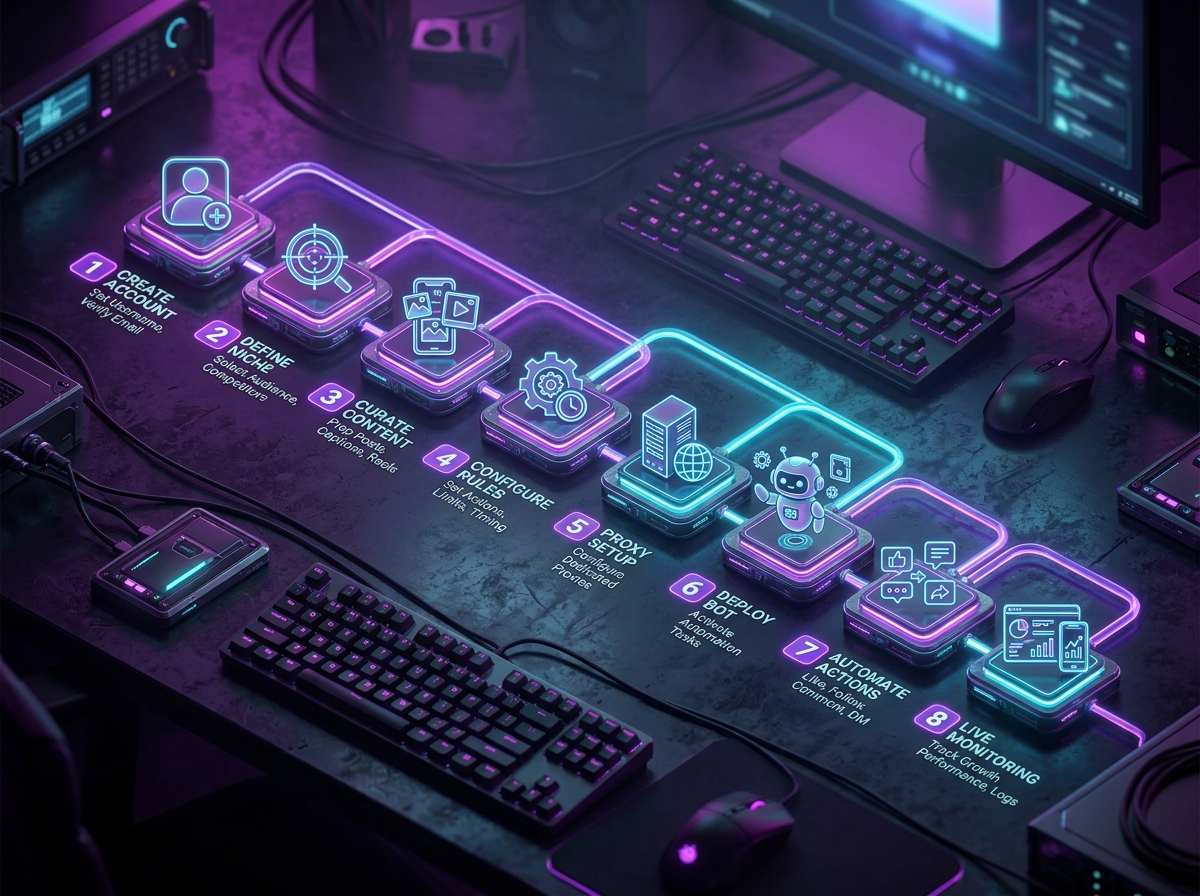
Step 1: Create Your QuickDM Account and Connect Instagram
Visit quickdm.app and sign up with your email or Google account. Navigate to the connections page and select Instagram. You will be redirected to Meta's official OAuth login flow — never enter your Instagram password directly into QuickDM. Connect Instagram to automation tool by authorizing messaging permissions and selecting the correct Instagram account from the dropdown. Account verification typically completes within 30 seconds. If you manage multiple Instagram accounts, you can connect them individually and switch between them from the QuickDM dashboard.
Step 2: Create a New Comment-to-DM Automation
Inside QuickDM, navigate to Automations → Comment to DM. Click "New Automation" and name it descriptively — e.g., "Jewelry Price Request" or "Course Enrollment Feb 2026." Instagram comment to DM setup guide recommends choosing your trigger scope next: apply this automation to a specific post (ideal for campaign-specific flows) or universally to all posts (ideal for evergreen offers like pricing requests). Universal triggers save setup time but require broader keyword choices that work across all content types.
Step 3: Define Your Keyword Trigger
Enter your trigger keywords in the designated field. QuickDM supports multi-keyword mapping, so "PRICE," "COST," and "HOW MUCH" can all trigger the same flow. Keywords are case-insensitive. Keyword trigger configuration best practices suggest avoiding generic words. A keyword like "YES" will accidentally trigger on every affirmative comment in your thread. Test your keywords by typing them into the preview box to see if they match common comment variations. Save your automation after entering keywords — you can return to edit them later without disrupting active flows.
Step 4: Write Your Automated DM Message
Your first DM message should be under 300 characters, value-first, and friendly. Start with personalization: "Hi {{first_name}}!" Then deliver the promised value immediately: "Here's the price list you requested for our summer collection." Include a call-to-action button when possible: "Shop Now," "Ask a Question," or "View Catalog." Avoid sounding robotic in automated DMs by writing as if you were texting a friend, not broadcasting a press release. Avoid excessive emojis — one or two per message is sufficient. Preview your message in the QuickDM simulator to check character count and formatting.
Step 5: Configure Public Auto-Reply
Enable the public auto-reply toggle to implement the hybrid strategy. Write 3-5 rotating variations so the same reply does not appear repeatedly. Example templates: "Just sent you the details in DM!", "Check your inbox for the full info.", "DM'd you the link — let me know if you have questions!", "Sent! Check your private messages.", "Link delivered to your DMs." Human-sounding automation templates use warm, brief language and vary sentence structure. Enable emoji rotation if your tool supports it, but keep the tone professional for B2B accounts and playful for creator accounts.
Step 6: Enable Follower Gate (Optional)
If you want to use follower gating, toggle the feature on and write your fallback message for non-followers. Example: "Hi {{first_name}}! Follow us first, then comment again with 'PRICE' and I'll send the catalog instantly." QuickDM follower gate feature setup includes a preview mode where you can test the gate logic with a secondary account that does not follow you. Ensure the fallback message is polite and clearly explains the value they will receive after following. Never make the gate feel punitive; frame it as joining an exclusive community.
Step 7: Test Before Going Live
Testing is non-negotiable. Use a secondary Instagram account to comment your trigger keyword on the target post. Verify: (1) Did the DM arrive within 30 seconds? (2) Did the public reply appear correctly? (3) Did the follower gate behave as expected? (4) Are the buttons clickable? Test Instagram automation before going live using a checklist. Common failures include keywords that are substrings of common words ("A" triggers on "thanks a lot") and messages that exceed Meta's 1,000-character limit. Fix all issues in draft mode before activating the automation.
Step 8: Monitor, Optimize, and Scale
Once live, monitor your QuickDM analytics dashboard daily for the first week. Track trigger rate, DM delivery rate, and user reply rate. Instagram automation best practices recommend A/B testing DM copy and keywords monthly. If one keyword has a low trigger rate, it may be too long or ambiguous. If DMs are delivered but users rarely reply, your call-to-action may be weak. Scale by creating additional automations for different product lines, events, or content types. A mature account might run 10-15 simultaneous automations, each optimized for a specific audience segment.
Advanced Instagram Comment Automation Tactics for 2026
Multi-Language Keyword Sets
India's linguistic diversity is a massive automation opportunity. QuickDM supports Hindi, Gujarati, Tamil, Telugu, and other regional language keywords. Set up multiple keywords triggering the same flow: "PRICE" for English speakers, "कीमत" for Hindi speakers, "விலை" for Tamil speakers. Multi-language Instagram automation requires no additional setup — simply enter the regional language keywords in the trigger field. This is especially powerful for travel agencies, coaching institutes, and D2C brands targeting tier-2 and tier-3 cities where English proficiency varies. Regional language automation often sees 20-30 percent higher engagement rates because users feel the brand speaks their language literally.
Post-Specific Keyword Flows
Universal triggers work for evergreen offers, but post-specific flows allow precise campaign tracking. Create a unique automation for each product launch, event announcement, or seasonal promotion. Post-specific automation flows let you isolate performance by content piece. If your Reel for Product A generates 50 triggers and Product B generates 5, you know where to allocate your content budget. Campaign-specific temporary flows can be scheduled to auto-deactivate after the campaign ends, preventing outdated offers from being delivered months later.
WhatsApp Handoff for Hot Leads
Some conversations are too complex for Instagram DM. For real estate, travel, and high-ticket services, transfer high-intent conversations to WhatsApp while preserving full context. WhatsApp handoff from Instagram can be triggered by a user clicking a "Continue on WhatsApp" button in your DM. The handoff message includes the original keyword, post reference, and any data collected during the Instagram DM phase. This ensures your sales team on WhatsApp knows exactly what the lead wants before the conversation begins. Note that QuickDM does not yet offer native WhatsApp integration, but you can include WhatsApp links in your DM buttons as a manual handoff method.
A/B Testing DM Copy and Keywords
Systematic testing separates high-performing automations from mediocre ones. Test framework: run two versions of the same automation with different DM copy for 7 days each, keeping traffic source constant. A/B test Instagram DM campaigns by tracking open rate, reply rate, and conversion rate. Test keyword variants — "PRICE" vs "COST" vs "HOW MUCH" — to see which generates more triggers. Test message tone: direct vs friendly vs urgent. Iteration cycle recommendations: review weekly, rotate monthly, and overhaul quarterly. Small improvements compound; a 5 percent increase in reply rate can mean thousands of additional leads annually at scale.
Instagram DM Automation for Indian Creators and Businesses
Why QuickDM Is Built for India
QuickDM is headquartered in Mumbai, making it the only Instagram DM automation tool with India-based operations and dedicated INR pricing. At ₹399 per month, Pro costs less than three days of a virtual assistant's salary (₹500-800/day) while handling unlimited automations 24/7. Mumbai-based DM automation tool status means support understands Indian business context — UPI payment flows, GST invoicing requirements, and regional language nuances. Native Razorpay integration allows you to include payment links directly in automated DMs, enabling seamless checkout for Indian D2C brands. No competitor offers INR-denominated plans: ManyChat Pro at $29/mo equals roughly ₹2,400, which is 6x more expensive than QuickDM Pro.
Indian D2C and Creator Use Cases
Indian fashion and D2C brands use comment "PRICE" triggers to send WhatsApp catalog links plus UPI payment options. Ed-tech coaches running UPSC, CA, NEET, and fitness programs use "BATCH" triggers to automate enrollment with Razorpay links. Indian D2C Instagram automation for real estate in Mumbai, Bangalore, Pune, and Delhi NCR uses "BROCHURE" triggers to deliver project PDFs and site visit booking calendars. Food and cloud kitchen brands use "MENU" triggers to send today's menu PDFs with direct ordering links. Event organizers for stand-up comedy and workshops use "TICKETS" triggers with BookMyShow integration or direct UPI collection. Regional influencers in Marathi, Tamil, Telugu, and Gujarati use multi-language keyword support to engage audiences in their native languages.
Indian Pricing Comparison (INR)
For Indian businesses, currency conversion and international billing create unnecessary friction. QuickDM eliminates both by pricing in INR. ₹399 Instagram automation plan comparison shows dramatic savings:
| Tool | Monthly Price (INR) | Annual Price (INR) | DM Cap | Free Plan? |
|---|---|---|---|---|
| QuickDM | ₹399/mo | N/A (monthly only) | 185/hr | Yes (forever) |
| ManyChat Pro | ~₹2,435/mo ($29) | ~₹26,100 ($348) | 2,500 contacts | Yes (25 contacts) |
| CreatorFlow Pro | ~₹1,260/mo ($15) | ~₹12,100 ($144/yr) | 5,000/mo | Yes (500 DMs) |
| LinkDM Pro | ~₹1,596/mo ($19) | ~₹15,200 ($182/yr) | 25,000/mo | Yes (1,000 DMs) |
| InstantDM Legend Pro | ~₹840/mo ($9.99) | N/A | 750/hr | No |
Getting Started: QuickDM Free Plan for Indian Users
Indian creators and small businesses can start with QuickDM's free plan, which provides 20 DMs per hour (480 daily), follow-gating up to 100 followers, and email collection up to 100 emails — all with no credit card and no time limit. Getting started with QuickDM free plan takes under 5 minutes. Upgrade to ₹399/mo Pro when you consistently hit the hourly limit. Mumbai-based support understands Indian business hours, festival season marketing cycles, and regional payment preferences. This is the lowest-risk entry point for any Indian business looking to automate Instagram engagement.
[CTA: Start your free QuickDM account with India-based support → https://quickdm.app/signup]Competitor Tool Overview: How QuickDM Compares
ManyChat — The Established Player with Pricing Problems
ManyChat is the most recognized name in Instagram automation, backed by Meta Business Partner status and multi-channel capabilities spanning Facebook Messenger and SMS. ManyChat vs QuickDM for Instagram reveals significant weaknesses: per-contact billing creates unpredictable costs, auto-scaling triggers plan upgrades without consent, and Trustpilot ratings sit at a concerning 2.4 out of 5 [Source: trustpilot.com/review/manychat.com, verified Jan 2026]. ManyChat is best suited for large agencies with complex multi-channel needs and budgets that can absorb contact-based billing volatility. For Instagram-focused creators and small businesses, the pricing model is often overkill.
CreatorFlow — The UX-Focused Alternative
CreatorFlow offers a beautiful, intuitive interface and reliable flat-rate pricing starting around $12-15 per month [Source: creatorflow.so/pricing, verified Jan 2026]. QuickDM vs CreatorFlow comparison shows CreatorFlow's strengths in user experience but weaknesses in India-specific features: no INR pricing, no UPI integration, and limited regional language support. The free plan caps at 500 DMs monthly, which exhausts quickly during viral periods. CreatorFlow is ideal for creators who prioritize ease of use over geographic customization and who operate primarily in English-speaking markets.
LinkDM — The Feature-Rich Mid-Range Option
LinkDM provides a comprehensive feature set with 25,000 DMs per month on its Pro plan at $19 per month [Source: linkdm.com/pricing, verified Jan 2026]. LinkDM vs QuickDM analysis shows LinkDM's strength in volume but weakness in pricing transparency and India support. There is no Trustpilot presence, making independent verification difficult. The free plan offers 1,000 DMs monthly, which is generous but time-limited in practice. LinkDM suits mid-size brands needing high DM volume and willing to pay a premium for feature breadth.
InstantDM — The Budget Option with Inconsistencies
InstantDM's Legend Pro tier starts at $9.99 per month with a 750/hour DM cap [Source: instantdm.com/pricing, verified Jan 2026]. InstantDM alternative research reveals inconsistent free plan status — the official pricing page does not list a permanent free tier, though some third-party reviews mention one. Trustpilot ratings are 4.1 out of 5, but refund complaints appear frequently [Source: trustpilot.com/review/instantdm.com, verified Jan 2026]. InstantDM is best for price-sensitive users willing to accept support and billing uncertainty in exchange for low cost.
Why QuickDM Wins for Most Users
QuickDM is the only tool combining a true free-forever plan (unlimited automations, no credit card), dedicated INR pricing (₹399/mo), conservative safety limits (185/hr Pro), and Mumbai-based support. Best value Instagram automation tool comparisons consistently show QuickDM winning on price predictability and India-specific features. Flat-rate billing means your invoice never surprises you. Meta-compliant architecture means your account never faces suspension risk. For Instagram-first creators, D2C brands, and Indian small businesses, QuickDM offers the optimal balance of capability, safety, and cost.
DM Automation Safety: Avoiding Shadowbans and Account Restrictions
Official Meta API vs Unofficial Bots — The Critical Difference
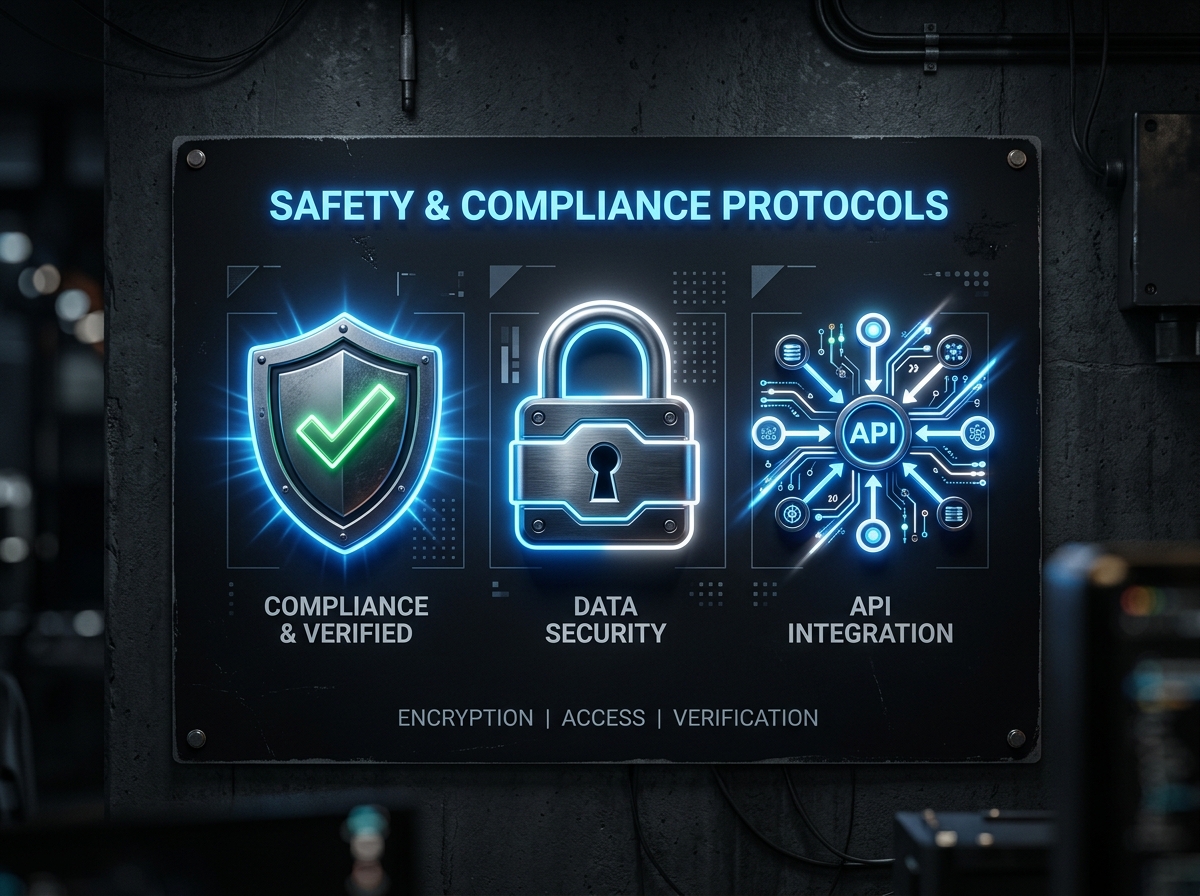
The single most important safety decision you make is choosing between official API tools and unofficial bots. Meta's Business Partner program verifies that tools use legitimate API endpoints, encrypted token handling, and published rate limits. Instagram shadowban myth busting starts here: official API automation does not cause shadowbans. Unofficial bots that scrape Instagram's web interface or reverse-engineer private APIs violate Instagram's terms of service and trigger detection systems designed to identify spam. Shadowban risks from non-compliant tools include reduced reach, disabled messaging, and permanent account deletion. Always verify your tool's API compliance before connecting your account.
Signs Your Automation Tool Is Putting You at Risk
Red flags are easy to spot once you know what to look for. If a tool asks for your Instagram password instead of redirecting to Meta's login portal, it is unofficial. If it claims "unlimited DMs" or "no rate limits," it is either lying or dangerous. Avoid Instagram automation bans by checking for a Meta Business Partner badge, visible rate limiting documentation, and transparent API connection flows. When Instagram detects policy violations, it typically issues warnings before restrictions, but repeat offenses can result in immediate permanent bans. Recovery is difficult and often impossible for business accounts.
QuickDM's Safety-First Architecture
QuickDM is built exclusively on the official Meta Business API with conservative rate limits designed for long-term account health. Smart failure handling detects API throttling before Meta enforces it, automatically slowing down delivery to stay within safe zones. QuickDM safety features include transparent compliance documentation, no password storage, and automatic queue management during traffic spikes. The platform's 185 DMs/hour Pro cap and 20 DMs/hour Free cap are intentionally set far below Meta's 750/hour ceiling, creating a safety buffer that protects your account even during unexpected viral traffic. This is the architecture of a tool built by people who understand that your Instagram account is your business.
DM Copy Templates and Keyword Ideas You Can Use Today
Proven Keyword Trigger List by Industry
Keyword selection determines your automation's trigger rate and relevance. Use short, action-oriented words that relate directly to your offer. Keyword ideas for Instagram automation vary by industry:
| Industry | Primary Keywords |
|---|---|
| E-commerce | PRICE, LINK, SHOP, BUY, CATALOGUE |
| Real estate | INFO, MAP, VISIT, PRICE, BROCHURE |
| Coaching | JOIN, ENROLL, BATCH, DETAILS, FEE |
| Restaurants | MENU, TABLE, BOOK, OFFER, LOCATION |
| Travel | PACKAGE, PRICE, ITINERARY, BOOK, INFO |
| Events | TICKETS, RSVP, BOOK, PRICE, DETAILS |
| Creators | GUIDE, TEMPLATE, PDF, CHECKLIST, LINK |
| High-ticket | CALL, CONSULT, BOOK, INFO, PRICE |
DM Message Templates That Convert
Template 1 (E-commerce): "Hi {{first_name}}! Here's our summer collection price list. Tap 'Shop Now' to order with free shipping this week." Template 2 (Coaching): "Hi {{first_name}}! The next CA Foundation batch starts March 15. Fee: ₹12,500. Tap below to reserve your seat." Template 3 (Real estate): "Hi {{first_name}}! I've sent the 2BHK brochure and site visit calendar. Book a slot that works for you." Template 4 (Restaurant): "Hi {{first_name}}! Here's tonight's menu and reservation link. We save tables for 15 minutes after booking." Template 5 (Follower-gated): "Hi {{first_name}}! Thanks for following. Here's your exclusive SEO checklist PDF. Reply 'HELP' if you need support." Instagram DM templates that convert share common traits: under 300 characters, immediate value delivery, and a single clear next action.
Public Reply Templates That Sound Human
Rotate these 5 variations to avoid robotic repetition: "Just sent you the details in DM!", "Check your inbox for the full info.", "DM'd you the link — let me know if you have questions!", "Sent! Check your private messages.", "Link delivered to your DMs." Human-sounding automation templates use warm, brief language. Vary emoji usage — some replies with a simple emoji, others without. Match tone to your brand: professional services should skip emojis entirely, while lifestyle brands can use them liberally. The goal is for a casual scroller to not realize the reply is automated.
Measuring Success: Key Metrics for Comment-to-DM Automation
Core KPIs to Track
Data-driven optimization requires tracking the right metrics. Trigger rate measures what percentage of total comments match your keywords — low rates mean your keywords are too obscure or your CTA is unclear. DM delivery rate tracks successful sends versus triggers — gaps here indicate API or rate limit issues. Instagram automation KPIs include response rate (users who reply to your automated DM), conversion rate (desired action divided by DM deliveries), follower growth rate from gated content, and revenue attribution traced back to DM automation. Export these metrics weekly to identify trends before they become problems.
| KPI | Formula | Benchmark |
|---|---|---|
| Trigger rate | Keyword comments / Total comments | 15-25% |
| DM delivery rate | Successful DMs / Triggers | >95% |
| Response rate | Users who reply / DM deliveries | 30-45% |
| Conversion rate | Desired actions / DM deliveries | 5-12% |
| Follower growth rate | New followers from gated content / Total triggers | 15-40% |
QuickDM Analytics Dashboard Overview
QuickDM's analytics dashboard provides real-time trigger and delivery metrics without requiring external tools. View hourly, daily, and monthly breakdowns of automation performance. Instagram automation analytics include exportable CSV reports for deeper analysis in Google Sheets or Excel. Filter by automation name, post, or keyword to identify your highest-performing content. The dashboard also surfaces failure reasons — throttling, invalid keywords, or disconnected accounts — so you can fix issues proactively rather than discovering them through lost leads.
Optimization Cycle
Weekly: review keyword performance and rotate public reply variations to prevent pattern fatigue. Monthly: A/B test DM copy and analyze conversion funnel drop-off points. Optimize Instagram automations quarterly by expanding to new use cases and scaling successful automations across additional posts or accounts. Automation is not a set-and-forget system; it is a living asset that improves with iteration. The brands seeing 10x ROI from comment automation are the ones that review metrics weekly and test new copy monthly.
Frequently Asked Questions
What is Instagram comment to DM automation?
Instagram comment to DM automation is a system that detects specific keywords in comments on your posts or Reels and automatically sends a private direct message to the commenter. It works through the official Meta Business API, making it a safe, compliant way to respond instantly to high-intent engagement 24/7. Every comment with a trigger keyword becomes an opportunity to deliver pricing, links, or resources directly to a prospect's inbox.
Is Instagram comment to DM automation safe?
Yes — when you use a Meta-approved tool like QuickDM that connects through the official Instagram Business API. Safe automation only responds to inbound comments on your own content using keyword triggers, which is fully compliant with Instagram's terms. Avoid unofficial bots that require your password or promise "unlimited DMs," as these violate Instagram's policies and can result in shadowbans or permanent account suspension.
What are the Instagram DM rate limits for comment replies?
Meta's official Private Replies API allows up to 750 private reply calls per hour per Instagram professional account for comments on posts and Reels. Most reputable tools set lower internal safety caps — QuickDM operates at 185 DMs/hour on Pro and 20 DMs/hour on Free, keeping you well within safe territory. These limits reset hourly and apply per account, not per tool.
How much does Instagram comment to DM automation cost?
Costs vary significantly by tool. QuickDM offers a free-forever plan with 20 DMs/hour, follow-gating up to 100 followers, and email collection up to 100 emails. Paid plans start at $10/mo globally or ₹399/mo for India — the cheapest INR-priced option available. Competitors like ManyChat start at $14/mo but use per-contact billing that can escalate unpredictably, while CreatorFlow starts at ~$12/mo and LinkDM at $19/mo.
Which is the cheapest Instagram DM automation tool?
QuickDM is the cheapest Instagram DM automation tool with a true free-forever plan that includes unlimited automations, 20 DMs/hour, follower gating up to 100 followers, and email collection up to 100 emails — all with no credit card required. For paid plans, QuickDM Pro at $10/mo (or ₹399/mo in India) is the most affordable option compared to ManyChat ($14–29/mo), CreatorFlow (~$12–15/mo), LinkDM ($19/mo), and InstantDM ($9.99/mo with no verified free tier). Unlike ManyChat and Inrō, QuickDM uses flat-rate pricing with no per-contact fees, so your bill never surprises you.
Is there a truly free Instagram DM automation tool?
Yes — QuickDM offers a genuinely free-forever plan with no credit card required and no time limit. You get unlimited automations, 20 DMs/hour (480/day), follow-gating up to 100 followers, and email collection up to 100 emails. This is more generous than ManyChat's free tier (25 contacts, 4 automations), and unlike InstantDM, QuickDM's free plan is clearly documented and permanently available. You can upgrade to Pro whenever you need higher limits.
Which Instagram automation tool is best for India?
QuickDM is the best Instagram automation tool for India because it's the only platform with dedicated INR pricing (₹399/mo for Pro), a Mumbai-based headquarters, and native UPI/Razorpay integration for payment links in DMs. No other competitor offers INR-denominated plans — ManyChat ($29/mo Pro = ~₹2,400), CreatorFlow (~₹1,260/mo), and LinkDM (~₹1,596/mo) all charge in USD. QuickDM also supports regional language keywords and understands the Indian creator economy and D2C landscape.
How do I set up comment to DM automation?
Setting up takes about 5–10 minutes: (1) Ensure you have an Instagram Business or Creator account, (2) Sign up for QuickDM and connect your Instagram via the official Meta login, (3) Navigate to Automations → Comment to DM, (4) Choose your trigger post or set a universal trigger, (5) Enter your keywords (e.g., "PRICE", "GUIDE"), (6) Write your automated DM message (under 300 characters), (7) Enable public auto-reply with 3–5 rotating variations, and (8) Test with a secondary account before going live. See our complete setup guide for screenshots and detailed walkthrough.
What's the difference between public comment replies and private DM automation?
Public comment replies appear under the comment on your post and are visible to everyone — they boost algorithm engagement and provide social proof. Private DM automation sends a direct message only the commenter can see — ideal for links, pricing, sensitive info, and lead qualification. The hybrid strategy (public acknowledgment + private DM delivery) is the best practice, combining algorithm benefits with conversion optimization.
Can Instagram comment automation get me shadowbanned?
No — if you use a Meta-approved tool that operates through the official API with keyword-triggered inbound responses on your own content. Shadowbans occur when you use unofficial bots, send outbound cold DMs, automate actions on others' posts, or engage in spam-like behavior. QuickDM is built on the official Meta Business API with conservative rate limits specifically designed to protect your account health. Read our full shadowban analysis for a complete safety breakdown.
What keywords should I use for comment automation?
Use short, unambiguous, action-oriented words that relate directly to your offer — never generic conversational words. For e-commerce: PRICE, SHOP, LINK, BUY. For real estate: INFO, BROCHURE, VISIT. For coaching: JOIN, BATCH, ENROLL. For restaurants: MENU, TABLE, BOOK. For creators: GUIDE, TEMPLATE, PDF. Keep keywords under 10 characters when possible, avoid case sensitivity issues, and never use words people type in normal conversation (like "yes" or "ok").
How fast are automated DMs sent after a comment?
With Meta-approved tools like QuickDM, automated DMs typically arrive within 10–30 seconds of the comment being posted. This near-instant response captures leads while their intent is highest — compared to manual replies that average 2–8 hours. During viral traffic spikes (500+ comments), automation handles every single comment simultaneously without delays.
Can I collect emails and phone numbers through DM automation?
Yes — QuickDM and most major tools support in-DM data collection through button responses and text input fields. You can require email submission before delivering a resource (email gating), collect phone numbers for WhatsApp follow-up, and store all data in a built-in CRM or export to Google Sheets, Mailchimp, or other marketing tools. QuickDM's free plan supports up to 100 email collections.
Does comment to DM automation work on Reels, Stories, and carousels?
Comment automation works on all Instagram posts including feed posts, Reels, and carousel posts. It triggers when someone comments on the post with your designated keyword. Story reply automation is a separate feature (triggered by Story interactions, not comments). Live comment auto-DM is also available through some tools but uses different API endpoints with separate rate limits.
What industries benefit most from comment to DM automation?
The 8 highest-ROI industries are: (1) E-commerce/D2C — instant price and purchase link delivery, (2) Real estate — property info and site visit booking, (3) Coaching/course creators — enrollment funnels, (4) Restaurants — menu and reservation links, (5) Travel agencies — package details and WhatsApp handoff, (6) Events/ticketing — instant ticket sales, (7) Workshop creators — follower-gated resources, and (8) High-ticket services — pre-qualification before human sales. Any business receiving "how much?" or "where to buy?" comments on Instagram should implement this immediately.
Can I use multiple automation tools at the same time?
Using multiple tools simultaneously is not recommended. Instagram's systems can detect conflicting API calls from different tools, which may flag your account for unusual activity. If you need to switch tools, disconnect your Instagram from the old tool completely before connecting it to a new one. QuickDM offers all major features (comment-to-DM, Story replies, follower gating, email collection) in a single platform, eliminating the need for multiple tools.
What happens if someone comments the keyword multiple times?
Most tools, including QuickDM, are configured to send only one DM per user per automation to avoid spamming. If the same user comments the keyword again, the system typically recognizes the duplicate and suppresses the second send. You can configure follow-up messages within the same conversation flow after the user replies to your initial DM, opening the 24-hour messaging window for further engagement.
How many automations can I run at once?
QuickDM allows unlimited automations on both Free and Pro plans — create as many keyword-triggered flows as you need for different posts, products, or campaigns. ManyChat limits free users to 4 active automations. We recommend starting with 2–3 core automations (e.g., one for pricing, one for resources, one for support) and expanding as you analyze performance data.
What is the 24-hour messaging window and how does it affect automation?
Instagram allows businesses to send free-form messages within 24 hours of a user's last interaction (comment, DM reply, Story reaction). After 24 hours of inactivity, you can only send templated messages approved by Meta. Comment-to-DM automation naturally resets this window because every new comment counts as a fresh interaction — meaning users who engage regularly can always receive your automated responses.
Do I need coding skills to set up comment to DM automation?
No coding is required. QuickDM and all major competitors provide visual, no-code interfaces where you select triggers, enter keywords, and write message copy through simple forms. Setup takes 5-10 minutes and requires only basic familiarity with Instagram Business accounts. If you can write an Instagram caption, you can set up automation.
Conclusion: Start Automating Your Instagram Comments Today
Instagram comment to DM automation is no longer a nice-to-have feature for large brands — it is essential infrastructure for any creator or business that uses Instagram as a revenue channel. The math is simple: every unanswered comment is a lost lead, and manual teams cannot match the speed, scale, or consistency of automated systems. QuickDM's free-forever plan removes every barrier to entry, giving you unlimited automations, 20 DMs per hour, and follower gating at zero cost. When you are ready to scale, Pro at $10/mo or ₹399/mo delivers 185 DMs per hour with the safety and predictability that only a Meta-compliant, Mumbai-based platform can offer. Stop losing revenue to missed comments and slow response times. Set up your first automation today and turn every comment into a conversation, every conversation into a lead, and every lead into a sale.
[CTA: Create your free QuickDM account — no credit card required → https://quickdm.app/signup]